Testimonial Collection Forms: 5 Templates That Get Completed (2026)
Updated

On this page
- Why guided prompts change everything
- The prompts that work
- 5 form templates to copy
- 1. The quick text form (30 seconds)
- 2. The guided story form (2 to 3 minutes)
- 3. The video-first form
- 4. The post-purchase form
- 5. The QR code form
- Design rules that move completion
- Consent, and why the checkbox matters
- Where to send the form
- Build it without building it
- Frequently Asked Questions
A testimonial collection form gets completed when it does four things: it uses guided prompts instead of an open box, stays under six fields, never requires an account, and offers video, text, and audio in one form. Here are 5 templates to copy.
Quick answer: A testimonial collection form is a branded page where customers submit text, video, or audio testimonials. The best forms use guided prompts ("What problem did we solve?", "What results did you get?") instead of open-ended "Tell us what you think." Keep it under six fields, never require an account, offer video, text, and audio in the same form, and include an explicit consent checkbox. A warm request to a happy customer should complete at 30 to 50 percent.
Why guided prompts change everything
Ask an open question and you get an open answer. "Tell us what you think" produces "Great product, highly recommend", not because the customer is lazy but because you have given them no idea what you are looking for. They do not know whether you want two lines or two paragraphs, the feature or the outcome, praise or specifics.
Guided prompts remove the guesswork. Compare the same customer under two forms:
| Open-ended form | Guided form |
|---|---|
| "Tell us about your experience" | "What problem were you trying to solve?" |
| "What did you try before this?" | |
| "What specific result have you seen?" | |
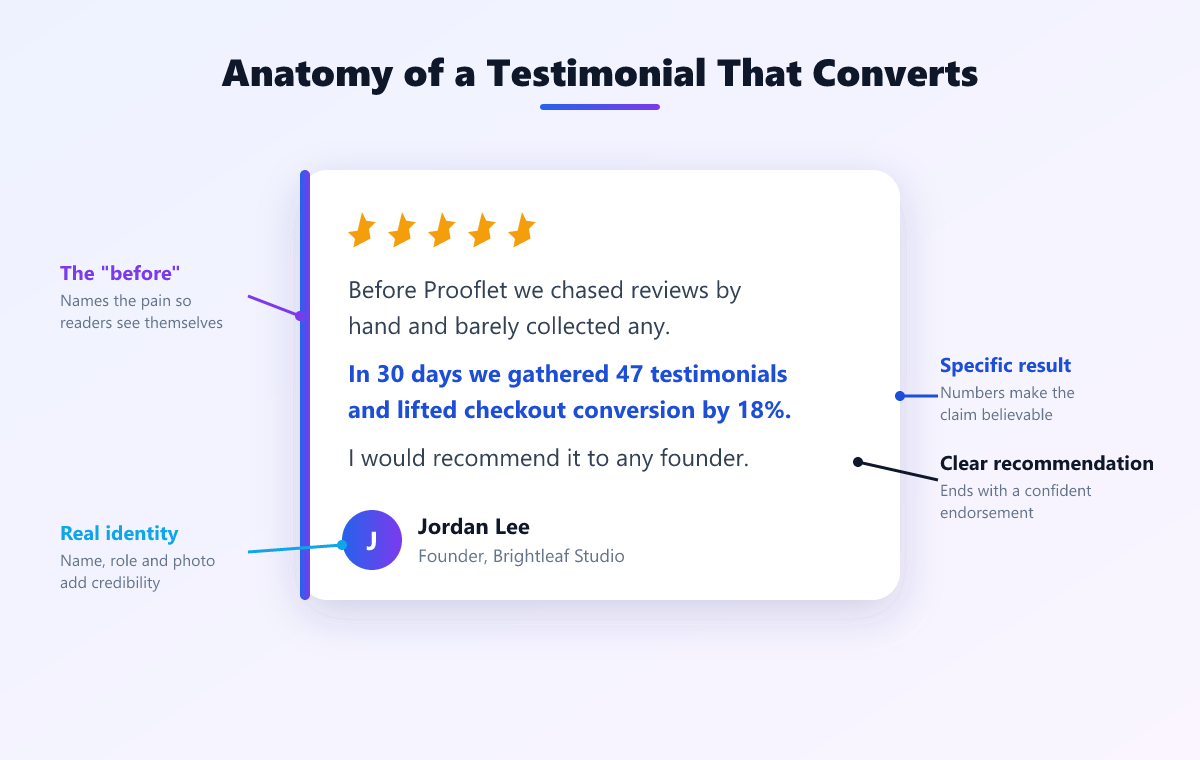
| Result: "Really happy with the service, would recommend." | Result: "We were chasing testimonials manually and getting maybe one in ten back. Six weeks in we have 34 published and the pricing page converts 22% better." |
Same customer, same goodwill, entirely different asset. The second one passes the specificity test in our guide to testimonial examples that convert; the first does not.
The prompts that work
Use three or four. More than four and completion drops sharply.
- What problem were you trying to solve before you found us? Sets up the before state that makes the result mean something.
- What did you try first, and why did it not work? Produces comparison language, which is the highest-intent testimonial type because your readers are evaluating the same alternatives.
- What specific result have you seen, and over what timeframe? The number. Ask for the timeframe explicitly or you will get results with no period attached.
- What would you say to someone on the fence? Speaks directly to the hesitant reader and usually produces the most quotable single line.
Optional fifth, useful for video: "What surprised you?" It reliably breaks people out of marketing register and into how they actually talk. There are more options in our list of 25 testimonial questions to ask clients.
5 form templates to copy
1. The quick text form (30 seconds)
Best for: volume, ecommerce, and customers you do not know well.
One prompt: "In a sentence or two, what did [product] do for you?" Plus name, email, and consent. Four fields total. Completion is the highest of any template here and the testimonials are usable but rarely outstanding.
2. The guided story form (2 to 3 minutes)
Best for: B2B, services, agencies, and anywhere the sale needs a real narrative.
The four prompts above, each as its own step with a one-line example underneath. Name, role, company, photo, consent. This is the default recommendation: it produces the before-and-after and comparison testimonials that do the most work on a pricing page.
3. The video-first form
Best for: your happiest customers, case studies, and homepage hero proof.
Show the prompts on screen while recording so the customer never loses their place. Cap it at 90 seconds, allow re-recording without limit, and always offer a "type it instead" escape hatch. Without that escape hatch you lose everyone who dislikes being on camera, which is most people.
4. The post-purchase form
Best for: ecommerce and subscriptions, fired automatically.
Trigger it a set number of days after delivery or after the first successful outcome, not after payment. Pre-fill name and order details so the customer only supplies the testimonial. One prompt, one star rating, one photo upload.
5. The QR code form
Best for: events, retail, restaurants, and in-person services.
A printed QR code on a receipt, table card, or badge opening straight into a mobile-optimised recording page. It has to work on a phone with no app and no login, and the prompt must be short enough to read while standing up.
Design rules that move completion
Never require an account. This is the biggest single drop-off. The customer is doing you a favour; do not charge them a signup for it.
Offer three formats in one form. Video, text, and audio, with the choice on the first screen. Audio in particular converts customers who will not go on camera but will happily talk for 40 seconds.
Keep it to one screen per prompt on mobile. Most testimonial links are opened on a phone. A long scrolling form with four textareas looks like homework.
Show progress. "Question 2 of 4" prevents the fear that this will go on forever.
Brand it. Your logo, your colours, ideally your domain. A form on an unfamiliar domain asking for a video of someone's face has an obvious trust problem.
Make the photo optional but ask. Attribution with a face is markedly more persuasive, but requiring it costs you submissions.
Say what happens next. One line: "We will review this and let you know before anything is published." It removes the fear of losing control of their words.
Consent, and why the checkbox matters
Do not treat consent as legal boilerplate to bury. Put a plain checkbox in the form:
I am happy for [company] to publish this testimonial, including my name, role, and photo, on its website and marketing materials.
Two reasons. First, in the EU and UK a recognisable face or voice is personal data under GDPR, so you need a lawful basis and a record of it; a timestamped checkbox is that record. Second, in the US the FTC's endorsement rules require that published testimonials be genuine and that any material connection, such as payment or a free product, is disclosed.
Practically: never publish anything without recorded consent, keep the record with the testimonial, and honour a withdrawal quickly if someone asks you to take it down.
Where to send the form
The best form still fails if the ask is badly timed. Send it within 48 hours of a win: a completed project, a strong result, a renewal, or a good support interaction. Send it from a person, not a no-reply address. Say how long it takes, and mean it.
Ready-made requests are in our testimonial request email templates, and the wider process is in how to get customer testimonials.
Build it without building it
You can assemble a rough version of this with a generic form builder plus separate video hosting plus a spreadsheet plus some embed code. It works, and it becomes a maintenance job roughly a month in.
Prooflet does the whole path: branded forms with guided prompts, video, text, and audio in one flow with no customer account, QR codes for in-person collection, consent captured on submission, then publishing through a widget that loads in under 50ms. It also imports the proof you already have from Google, LinkedIn, G2, and 30 or so other platforms. Plans are one-time from $59 and there is a free forever plan. See how collection works or compare plans.
Frequently Asked Questions
1. What is a testimonial collection form?
A branded page where customers submit a testimonial as video, text, or audio. You send a link, the customer answers a short set of guided prompts and records or types their answer, and the submission lands in your testimonial library ready to approve and publish.
2. What questions should a testimonial form ask?
Three or four specific ones, never "tell us what you think." The reliable set is: what problem were you trying to solve, what did you try before, what specific result have you seen, and what would you say to someone on the fence. Specific prompts are the difference between "Great product!" and a testimonial you can publish.
3. How many fields should a testimonial form have?
Keep it under six. Name, email, role or company, the testimonial itself, a photo if you can, and a consent checkbox. Every extra field costs completions, and anything you can look up yourself should not be on the form.
4. Should a testimonial form require an account?
No. Forcing a signup before someone can praise you is the single largest drop-off in the whole process. A good form opens from a link and records in the browser with nothing to install and no account to create.
5. Do I need permission to publish a testimonial?
Yes. Get explicit consent in the form itself, with a checkbox stating where the testimonial may appear. In the EU and UK a face or a voice is personal data under GDPR, so you need a lawful basis and a record of it. A consent checkbox with a timestamp is that record.
6. What is a good testimonial form completion rate?
For a warm request sent to a happy customer shortly after a good outcome, 30 to 50 percent is realistic. Below 15 percent usually means the ask was mistimed, the prompts were vague, or the form demanded a signup or video with no alternative.